Installing SortLab
Install SortLab from the Shopify App Store, approve permissions, confirm billing, and open the embedded app.
SortLab installs as an embedded Shopify app. You approve access in Shopify, confirm the plan through Shopify Billing, and then manage sorting from the SortLab entry in your Shopify admin.
Install SortLab
Open the Shopify App Store listing
Go to SortLab on the Shopify App Store and click Install. Shopify will ask which store you want to install the app on if you manage more than one store.
Approve app permissions
Shopify shows the scopes SortLab needs before installation. SortLab uses them for sorting, analytics, billing state, and the storefront behavioral pixel.
| Access | Used for |
|---|---|
| Read products and inventory | Sync product titles, images, prices, variants, inventory levels, tags, vendors, product types, and collection membership. |
| Write products and publications | Reorder products inside collections and create or publish app-managed collections when you use SortLab's collection builder. |
| Read orders | Attribute line-item revenue, units sold, order counts, and sales velocity to managed collections. |
| Read customer events and write pixels | Install and read SortLab's Shopify Web Pixel for collection impressions, clicks, add-to-cart behavior, CTR, and engagement analytics. |
SortLab changes collection product order. It does not rewrite product titles, prices, descriptions, inventory quantities, customer profiles, or payment details.
Confirm billing in Shopify
SortLab subscriptions are approved through Shopify Billing. Choose Starter, Advanced, or Enterprise and confirm the recurring charge in Shopify. Eligible first-time stores receive a 14-day trial on the selected plan before paid billing begins.
Shopify manages the subscription approval and payment method. SortLab stores the resulting subscription state so the app can unlock the correct plan limits.
Open SortLab in Shopify admin
After approval, Shopify opens SortLab inside your admin. You can return any time from Apps > SortLab or from the SortLab item in the Shopify admin sidebar.
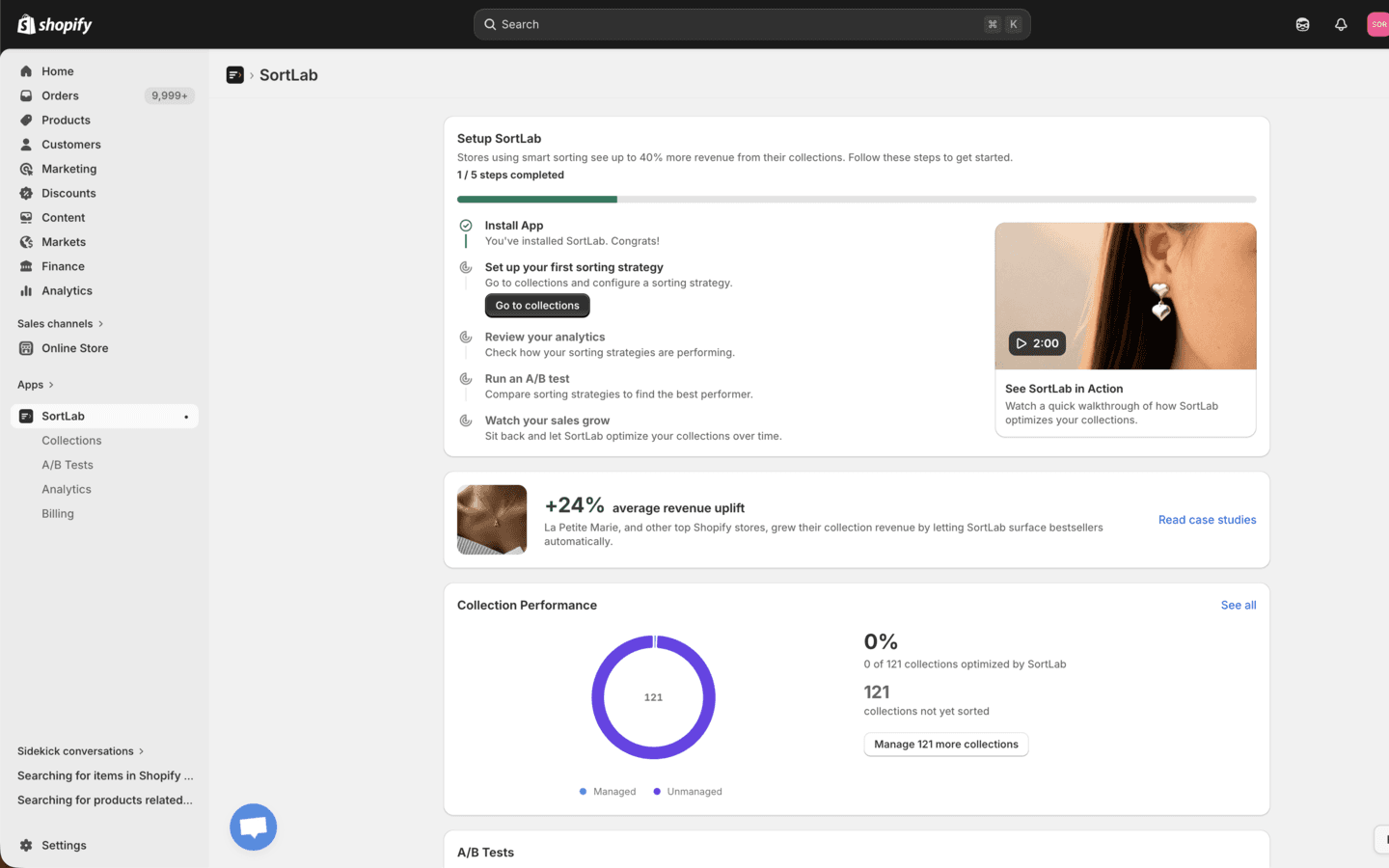
Onboarding Checklist
The dashboard includes a five-step setup guide:
- Install App - completed automatically after Shopify installation.
- Set up sorting strategy - choose a collection and apply your first strategy.
- Review analytics - return after sorting and order data begin flowing.
- Run A/B test - available on Advanced and Enterprise plans.
- Watch sales grow - monitor managed coverage and strategy performance over time.
Starter stores see A/B testing as a locked upgrade path. You can still sort collections manually or on a daily schedule.
What Appears First
The first dashboard view shows:
- Setup Guide progress.
- Collection Performance with managed vs. unmanaged collection coverage.
- Plan and usage limits from your active subscription.
- Help surfaces for feature requests, chat, and support.
- A/B Tests, Analytics, and Billing navigation in the SortLab sidebar.
Next Steps
- Quick Start Guide - Sort your first collection.
- Configuration - Learn the dashboard and plan limits.
- Plans & Pricing - Compare Starter, Advanced, and Enterprise.